


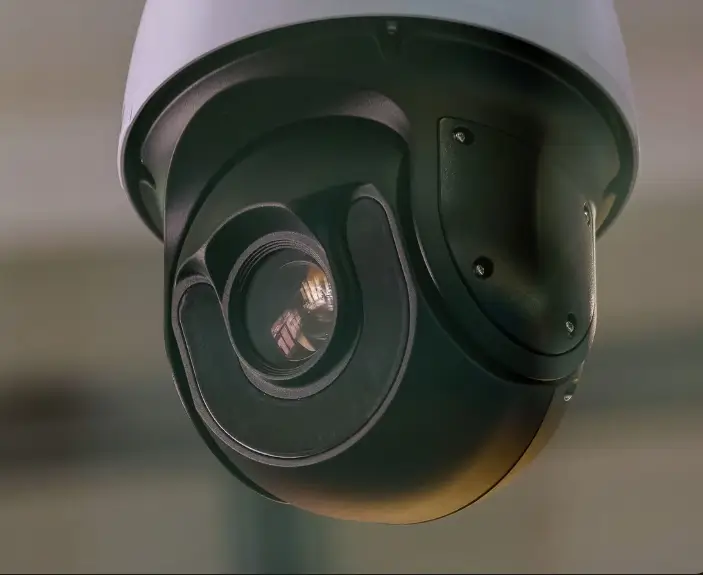
PTZ cameras have become a key component in modern video production, live streaming, and remote monitoring environments. Designed for flexibility and remote operation, PTZ (Pan-Tilt-Zoom) cameras allow operators to control camera movement and framing without physically repositioning the device.
In Kenya, PTZ cameras are increasingly used in broadcast studios, houses of worship, corporate environments, event venues, and surveillance setups where professional video quality and operational efficiency are essential.
What Is a PTZ Camera?
A PTZ camera is a video camera that can:
Pan (move left and right)
Tilt (move up and down)
Zoom (adjust focal length for close or wide shots)
All of this is controlled remotely using hardware controllers, software interfaces, or IP-based systems.
Unlike fixed cameras, PTZ cameras offer dynamic coverage from a single mounting position—reducing the need for multiple operators or physical camera repositioning.
Key Features of PTZ Cameras
1) Remote Pan, Tilt and Zoom Control
The defining feature of PTZ cameras is the ability to control movement remotely. Operators can adjust framing in real time, making them ideal for live production environments.
✔ Smooth directional movement
✔ Optical zoom for detailed close-ups
✔ Preset positions for quick transitions
2) High-Quality Video Output
Modern PTZ cameras support:
Full HD and 4K resolution
Professional broadcast outputs (SDI, HDMI, IP)
Low-light performance
Wide dynamic range
This makes them suitable for both live broadcasting and recorded productions.
3) IP-Based Control and Streaming
Many PTZ cameras support IP connectivity, allowing:
Remote control over local networks
Direct streaming to platforms
Integration into remote production systems
This feature is particularly valuable for distributed production environments.
4) Preset and Automation Capabilities
PTZ cameras can store preset positions. With a single command, the camera moves to a predefined angle—ideal for:
Church services
Conferences
Panel discussions
Lecture halls
Automation reduces operator workload and ensures consistent framing.
Control Options for PTZ Cameras
PTZ cameras can be controlled in several ways:
Hardware Controllers
Dedicated PTZ control panels allow tactile, precise camera movement. These are commonly used in broadcast control rooms and production studios.
Software-Based Control
Control can also be managed via software interfaces on a computer, enabling centralized operation of multiple cameras.
IP and Network Control
In IP-based setups, PTZ cameras can be managed over LAN or WAN networks—making them ideal for remote production environments.
This allows camera operators to work from a central control room rather than being physically present at the venue.
Common Use Cases for PTZ Cameras
1) Broadcast Studios
PTZ cameras reduce the need for multiple camera operators while still delivering professional multi-angle coverage.
2) Houses of Worship
Churches and faith-based organizations use PTZ cameras for:
Live streaming services
Multi-angle sermon coverage
Recording events and conferences
They provide professional output without large production teams.
3) Corporate and Institutional Events
PTZ cameras are ideal for:
Boardrooms
Corporate conferences
Hybrid events
Training sessions
They allow discreet installation while maintaining professional video quality.
4) Education and Lecture Capture
Schools and universities use PTZ cameras for:
Lecture streaming
Hybrid learning
Remote student access
Preset positions allow automatic switching between lecturer and presentation screens.
5) Remote Production Environments
When integrated into a remote production workflow, PTZ cameras can be controlled from a centralized production hub—reducing on-site technical staff.
What to Consider Before Choosing a PTZ Camera
When selecting a PTZ camera, consider:
Required resolution (HD vs 4K)
Optical zoom range
Output options (SDI, HDMI, IP)
Low-light performance
Integration with existing production systems
Network infrastructure
Choosing the right PTZ camera depends on your environment and intended workflow.
Delivering PTZ Camera Solutions in Practice
Successful PTZ deployments require more than just hardware. Network design, integration with switching systems, mounting considerations, and control setup all play a role in performance.
Sourcenet supplies and integrates PTZ camera systems tailored to broadcast, corporate, event, and institutional environments—ensuring seamless control and professional output.
Organizations looking to upgrade or deploy PTZ-based production setups benefit from proper system design and integration support.
What Organizations Gain From PTZ Cameras
Reduced need for multiple camera operators
Flexible multi-angle coverage
Clean, professional video output
Efficient control and automation
Scalable production environments
PTZ cameras provide a smart balance between professional video quality and operational efficiency.
Conclusion
PTZ cameras are a versatile and cost-effective solution for modern video production environments. Whether used for broadcast, live events, houses of worship, education, or corporate communication, they offer flexibility, remote control, and high-quality output in a compact form.
With proper integration and planning, PTZ systems can significantly improve production efficiency while maintaining professional standards.
Contact us to discuss PTZ camera solutions, or get a quote tailored to your production or facility needs.
👉 https://sourcenet.co.ke/contact